VLAN on a Home Router
TL;DR ✨
Today we will show how to configure Wi-Fi for home use so that visitors are separated from our internal network.
There is a MikroTik at the entry point, followed by a switch. The switch connects the machines on the LAN and one CAP. We want to configure it to broadcast two SSIDs on two different frequencies:
Today we will show how to configure Wi-Fi for home use so that visitors are separated from our internal network.
Let us start with the following basic network configuration:
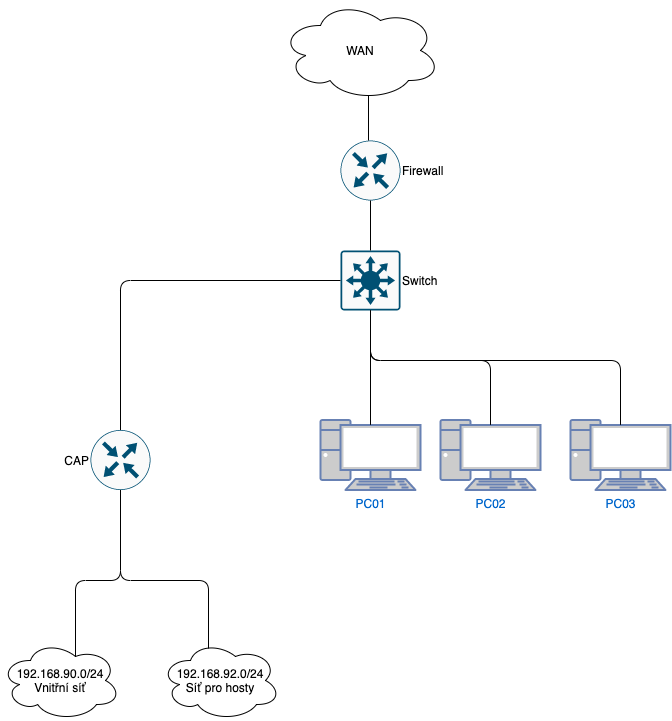
There is a MikroTik at the entry point, followed by a switch. The switch connects the machines on the LAN and one CAP. We want to configure it to broadcast two SSIDs on two different frequencies:
- SSID for the internal network on 2.4 GHz
- SSID for the internal network on 5 GHz
- SSID for the guest network on 2.4 GHz
- SSID for the guest network on 5 GHz
Let us see how to do this. For our purposes, we will use:
- Subnet 192.168.90.0/24 for the internal network
- Subnet 192.168.92.0/24 for the guest network
On the main MikroTik, we will need to work with:
- the DHCP server
- the firewall
- VLANs
- IP addresses
We will start by creating two VLANs:
- VLAN-90
- VLAN-92
/interface vlan
add interface=ether4-LAN name=vlan1-90 vlan-id=90
add interface=ether4-LAN name=vlan2-92 vlan-id=92
Next, we create bridge1-90 and add ether3 and VLAN-90 to it. Why Ether3? Because it leads to the switch that connects the machines on our LAN.
/interface bridge port
add bridge=bridge1-90 hw=no interface=ether3-LAN
add bridge=bridge1-90 interface=vlan1-90 trusted=yes
Assign IP addresses to both interfaces
/ip address
add address=192.168.90.1/24 comment=ip1-90 interface=bridge1-90 network=\
192.168.90.0
add address=192.168.92.1/24 comment=ip2-92 interface=vlan2-92 network=\
192.168.92.0
The easiest way to configure DHCP servers on both interfaces is with DHCP-setup.
/ip dhcp-server
add address-pool=pool1-90 authoritative=after-2sec-delay disabled=no interface=\
bridge1-90 lease-time=23h10m name=dhcp1-90
add address-pool=pool2-92 disabled=no interface=vlan2-92 name=dhcp2-92
/ip dhcp-server network
add address=192.168.90.0/24 comment=90 gateway=192.168.90.1
add address=192.168.92.0/24 comment=92 gateway=192.168.92.
Now we move to the CAP. The configuration here is slightly more complicated, but similar.
Configure the incoming VLANs on the CAP:
/interface vlan
add interface=ether1 name=vlan1-90 vlan-id=90
add interface=ether1 name=vlan2-92 vlan-id=92
Assign the CAP a static address from the internal subnet:
/ip address
add address=192.168.90.53/24 interface=bridge1-90 network=192.168.90.
Add the default route
/ip route
add distance=1 gateway=192.168.90.1
Configure DNS on the MikroTik
/ip dns
set servers=8.8.8.8
Move to the wireless interfaces section and configure the Wi-Fi passwords:
/interface wireless security-profiles
set [ find default=yes ] supplicant-identity=MikroTik
add authentication-types=wpa2-psk eap-methods="" management-protection=allowed \
mode=dynamic-keys name=Private supplicant-identity="" wpa2-pre-shared-key=\
heslo-privat
add authentication-types=wpa2-psk eap-methods="" management-protection=allowed \
mode=dynamic-keys name=public supplicant-identity="" wpa2-pre-shared-key=\
heslo-public
Now configure the wireless interfaces themselves. We will create two Wi-Fi networks on two different frequencies:
/interface wireless security-profiles
set [ find default=yes ] supplicant-identity=MikroTik
add authentication-types=wpa2-psk eap-methods="" management-protection=allowed \
mode=dynamic-keys name=Private supplicant-identity="" wpa2-pre-shared-key=\
Heslo-privat
add authentication-types=wpa2-psk eap-methods="" management-protection=allowed \
mode=dynamic-keys name=public supplicant-identity="" wpa2-pre-shared-key=\
heslo-public
/interface wireless
set [ find default-name=wlan1 ] band=2ghz-b/g/n disabled=no mode=ap-bridge \
name=wlan1-90 radio-name=2GHz_Private security-profile=Private ssid=\
2GHz_Private vlan-id=90 wps-mode=disabled
add disabled=no keepalive-frames=disabled mac-address=76:4D:28:3A:5D:10 \
master-interface=wlan1-90 multicast-buffering=disabled name=wlan1-92 \
security-profile=public ssid=2GHz_Guest vlan-id=92 wds-cost-range=0 \
wds-default-cost=0 wps-mode=disabled
set [ find default-name=wlan2 ] band=5ghz-a/n/ac disabled=no frequency=5300 \
mode=ap-bridge name=wlan2-90 radio-name=5GHz_Private security-profile=\
Private ssid=5GHz_Private vlan-id=90 wps-mode=disabled
add disabled=no keepalive-frames=disabled mac-address=76:4D:28:3A:5D:11 \
master-interface=wlan2-90 multicast-buffering=disabled name=wlan2-92 \
security-profile=public ssid=5GHz_Guest vlan-id=92 wds-cost-range=0 \
wds-default-cost=0 wps-mode=disabled
/interface wireless cap
set discovery-interfaces=*5 interfaces=wlan1-9
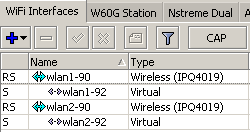
Warning: blindly copying the command will change the MAC addresses. Enter the MAC addresses used by your MikroTik before copying it. Also remember to change the passwords.
Configure the bridge interfaces
/interface bridge
add name=bridge1-90
add name=bridge2-92
/interface bridge port
add bridge=bridge1-90 interface=vlan1-90
add bridge=bridge1-90 interface=wlan1-90
add bridge=bridge1-90 interface=wlan2-90
add bridge=bridge2-92 interface=wlan1-92
add bridge=bridge2-92 interface=wlan2-92
add bridge=bridge2-92 interface=vlan2-92
We are almost done. Move back to the main MikroTik one more time and configure:
- the firewall
- NAT
For a cleaner setup, create an address list:
/ip firewall address-list

add address=192.168.90.0/24 list=valid_local_ip
add address=192.168.92.0/24 list=Guest-92
Configure the interface list
/interface list
add name=WAN
add name=LAN
add name=GUEST
/interface wireless security-profiles
/interface list member
add interface=ether1-WAN list=WAN
add interface=bridge1-90 list=LAN
add interface=vlan2-92 list=GUEST

/ip firewall nat
add action=masquerade chain=srcnat comment=MASQ out-interface-list=WAN \
src-address-list=valid_local_ip
add action=masquerade chain=srcnat comment=MASQ out-interface-list=WAN \
src-address-list=Guest-92
Finally, do not forget the most important rule: everything from GUEST is denied access to LAN.
/ip firewall filter
add action=drop chain=forward in-interface-list=GUEST out-interface-list=LAN