Backing Up Linux with rsync and Related Tools
TL;DR ✨
Linux offers highly advanced backup options. This article introduces several basic tools, explains how they are used, and compares their differences. The tools are:
This is the most straightforward tool, and all the other utilities described below build on the same basic idea. At its simplest, rsync copies data from point A to point B while accounting for file changes. It works both locally and remotely and also supports advanced parameters. The basics can be studied, for example, here. The following small example will serve as the basis for comparing it with the other options:
From the archive
This article was first published on 2017-10-22. It is also a snapshot of its time, so some details and recommendations may no longer reflect the current situation.
✨ 1. Introduction
Linux offers highly advanced backup options. This article introduces several basic tools, explains how they are used, and compares their differences. The tools are:
- rsync
- rdiff-backup
- duplicity
- rsnapshot
✨ 2. Tools
✨ 2.1. rsync
This is the most straightforward tool, and all the other utilities described below build on the same basic idea. At its simplest, rsync copies data from point A to point B while accounting for file changes. It works both locally and remotely and also supports advanced parameters. The basics can be studied, for example, here. The following small example will serve as the basis for comparing it with the other options:
rsync -av --append-verify -e ssh --include 'Dokumenty/' --include 'homes/' --include 'faktury/' --include 'hudba/' --include 'NetworkBackups/' --include 'PasswordDatabases/' --include 'photo/' --include --exclude '/volume1/NetworkBackups/Test' --exclude 'NetworkBackups/Les/' --exclude '@*' root@192.168.1.1:/svazek1/ /home/uzivatel/
🔍 The command above tells rsync to:
- Log in to the remote machine and enter the
svazek1/directory. - Copy data from
svazek1/tohome/uzivatel/on the local host. - Include the Dokumenty, faktury, homes, hudba, and other listed directories.
- Exclude every directory beginning with
@, as well as selected nested directories such as/NetworkBackups/Les/. - Use these file-copying options:
- e — remote transfer over SSH.
- a — archive mode, which preserves symlinks and file permissions and is equivalent to
rltgoD. Most importantly here, it is also recursive, so it copies files and subdirectories inside parent directories. - v — more verbose than usual, reporting every little detail in the terminal during copying.
- --append verify — if the transfer is interrupted, rsync attempts to find the partially transferred file and resume it, while checking that the partial data is not corrupted. In other words, it verifies that everything was copied correctly. This is very useful when data is being copied over, for example, the 5 GHz band.
rsync also has the -u (update) parameter. When this parameter is used for a backup, a backed-up file is written only if a newer version of it does not already exist at the destination.
✨ 2. 2. rdiff-backup
At first glance, it is almost the same as rsync, but it is not identical.
- Unlike rsync, rdiff-backup is written in Python and creates incremental backups. It allows a file to be restored to its state from several days earlier.
- Differential backups are stored in the
rdiff-backup-datasubdirectory. It can therefore be imagined as rsync with the-uoption, but with file-change history available as well. - rdiff-backup creates the first backup as a current snapshot and makes every subsequent copied backup incrementally. When a backup needs to be restored, a specific backup is selected and a restore command is issued for it.
- rdiff-backup can compress files, but it cannot encrypt the content being transferred.
- Its copying speed is similar to rsync.
For remote backups, rdiff-backup must be installed on the machine being backed up. This sounds trivial, but it is very important. Consider copying data from a Synology NAS to another machine: rdiff-backup cannot be used directly because it would have to be installed on the NAS. One workaround is to mount the remote Synology NAS using sshfs and then work with the mounted directory locally.
✨ 2.3. duplicity
Duplicity is a somewhat more economical and faster version of rdiff-backup. Its main differences from rdiff-backup are:
- Duplicity can encrypt the copied backup and compress the transferred content by default.
- Unlike rsync or rdiff-backup, duplicity does not calculate checksums by checking the source and destination directories and then comparing the results. It sets these calculations aside while creating the backup, calculates them locally, and transfers nothing for that purpose. This also shortens the backup time.
- When transferring data from a remote server, duplicity does not need to be installed on both the remote server and the local machine.
The following borrowed charts make the differences easier to compare:
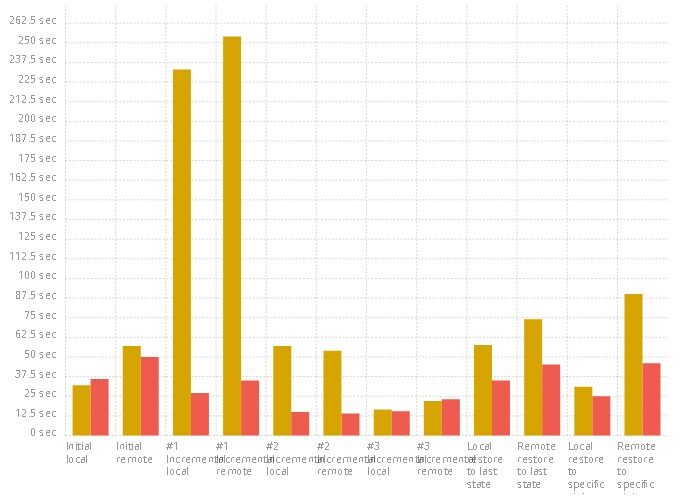 Time required to copy a constant amount of data. Yellow shows copying times for various source-and-destination storage combinations using rdiff-backup. Red shows copying times for various source-and-destination storage combinations using duplicity. The x-axis represents individual copy operations; the y-axis represents copying time.
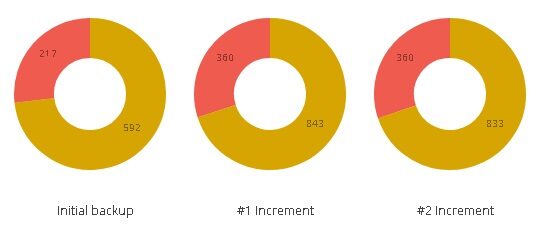 Backing up a constant amount of data. Yellow shows the amount of data on the destination storage when copied with rdiff-backup. Red shows the amount of data on the destination storage when copied with duplicity. Left: the original backup. Center: the first incremental backup. Right: the second incremental backup.
✨ 2.4. rsnapshot
rsnapshot is written in Perl and creates a virtual disk image, making it suitable for backing up entire operating systems.
- rsnapshot takes the current state of the source data and copies it to the chosen destination. On the next run, it does not copy the entire image; instead, it creates hardlinks pointing to unchanged files from the preceding backup. This makes the latest backups immediately visible, with no need to issue a command to extract a backup.
- rsnapshot does not support compression and does not have to be installed on both machines when copying remotely.
- rsnapshot is not as space-efficient as rdiff-backup or duplicity.
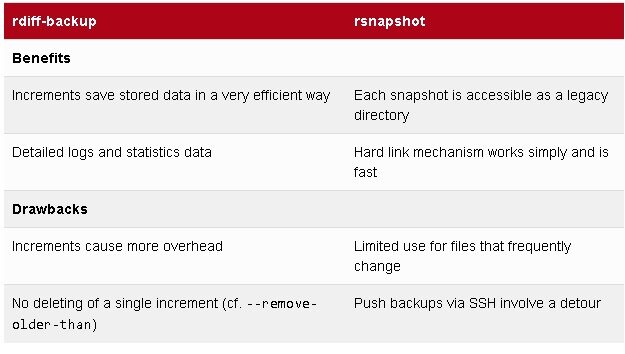
For additional context, the following borrowed table is retained in its original language and shows the differences between rdiff-backup and rsnapshot.
✨ 3. Recommendations
Which tool should be chosen? It always depends on what the user becomes comfortable with, and it is also important to remember that the end justifies the means. No single tool is inherently better or worse; each must serve a particular purpose. The following scenarios illustrate when each tool may be appropriate:
- For a beginner, the easiest route is to start with the basics: use rsync and adapt it to the user's needs. It is the simplest and can be bent to fit a workflow easily.
- If file versioning is required, it is better to start using rdiff-backup instead of rsync.
- When copying between a source and destination outside a trusted network and encryption is required, duplicity is ideal.
- When copying data from a machine on which rdiff-backup cannot be installed, choose duplicity.
- With poor connectivity, duplicity is definitely preferable to rdiff-backup or rsync.
- For an administrator serving clients with hosted VPS instances, rsnapshot is a good choice when a client asks for a two-day-old server backup.
✨ 4. Sources:
rsync: http://www.abclinuxu.cz/clanky/rsync-inteligentni-kopirovani-souboru
rdiff-backup: https://www.root.cz/clanky/zaloha-dat-pomoci-rdiff-backup/
Duplicity: https://www.linuxexpres.cz/praxe/sprava-linuxoveho-serveru-zalohovani-pomoci-duplicity
rsnapshot: https://www.root.cz/clanky/zalohujeme-s-rsnapshot/
Comparison of rsync and rdiff-backup: https://cookuop.co.uk/rsync-vs-rdiff-backup/
Advantages and disadvantages of rsync versus rdiff-backup: https://books.google.co.uk/books?id=6-w4fXbBInoC&pg=PA197&dq=rsync+vs+rdiff-backup&hl=en&sa=X&ei=qZg5U6fJFMGp7Aba6YCIAQ#v=onepage&q=rsync%20vs%20rdiff-backup&f=true
Charts comparing rdiff-backup and duplicity: https://blog.roundside.com/duplicity-vs-rdiff-backup-in-action/
Table comparing rdiff-backup and rsnapshot: http://www.admin-magazine.com/Articles/Backups-using-rdiff-backup-and-rsnapshot/(offset)/9