The Dude
TL;DR ✨
The author and his colleagues had been using The Dude to manage their network for some time. The software is available free of charge and does an excellent job.
The Dude can be run on just about any RouterBoard that no longer serves its original purpose adequately. The author and his colleagues instead ran it directly on their somewhat older server.
The author and his colleagues had been using The Dude to manage their network for some time. The software is available free of charge and does an excellent job.
The Dude can be run on just about any RouterBoard that no longer serves its original purpose adequately. The author and his colleagues instead ran it directly on their somewhat older server.

The main advantage is the speed at which data loads; it does not take nearly as long. The second advantage is remote desktop access. Whenever they work on backbone links or troubleshoot clients, all they need is a phone with a data connection and they have everything at hand.
The Dude's basic features are described in this PDF: DudeManual, or at this link.
The interesting part begins with The Dude's advanced capabilities.
1. SMS notifications
The author and his colleagues configured SMS notifications for backbone outages. To avoid being disturbed whenever a backbone device merely reboots, they configured a delay before a notification is sent. With a little searching, this guide can be found. The only application required is mailsend.
In The Dude on the server, enter the command parameter in the Notifications section:
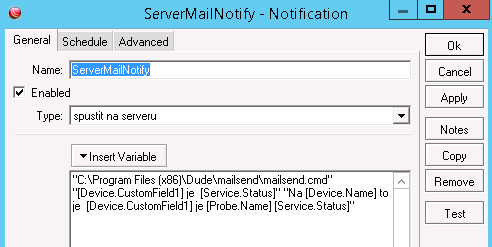
The application launch parameter in The Dude is:
"C:\Program Files (x86)\Dude\mailsend\mailsend.cmd" "[Device.CustomField1] je [Service.Status]" "Na [Device.Name] to je [Device.CustomField1] je [Probe.Name] [Service.Status]"
CustomField contains the nickname of their transmitter. Device.Name is the transmitter's logical name on the network. Probe.Name is the probe, most often ping, and Service.Status is the probe status (working/not working).
The mailsend application must be installed on the server :-)
The mailsend.cmd file itself contains:
::
:: Send email notifications from Dude
::
set mailsenderdir=C:\Program Files (x86)\Dude\mailsend
set mailsender=mailsend.exe
set smtpsender=achtung@connectica.cz
set smtpsenderfullname=Achtung
set smtpserver=smtp.test.cz
set smtpport=111
set smtpuser=ZJakehoMailuSeNotifyPosila@connectica.cz
set smtppwd=*heslo*
set mailto=MujMail@connectica.cz
::
::
"%mailsenderdir%\%mailsender%" -smtp %smtpserver% -port %smtpport% -ssl -auth -user %smtpuser% -pass %smtppwd% -t %mailto% -f %smtpsender% -name "%smtpsenderfullname%" +cc +bc -q -sub %1 -M %2
::
::pause
::
They configured email-to-SMS conversion on their VoIP PBX. This allows them to send text messages to authorized numbers during a crisis without requiring a hardware SMS gateway. Above all, it eliminates the hassle of dealing with a gateway, checking it, and risking its silent failure one day.
2. Advanced network architecture
The author searched the internet in vain for a program that could display the relationships and connections between their transmitters in a simple diagram. The Dude itself can do this, allows custom images to be added, and can display current readings. Any image from the web can simply be uploaded through Files and then inserted into the map. In their case, PoE ports and their cables are numbered. 4P is the cable from PoE port 4 that powers the device. 4L is the cable carrying connectivity.

3. Monitoring critical points
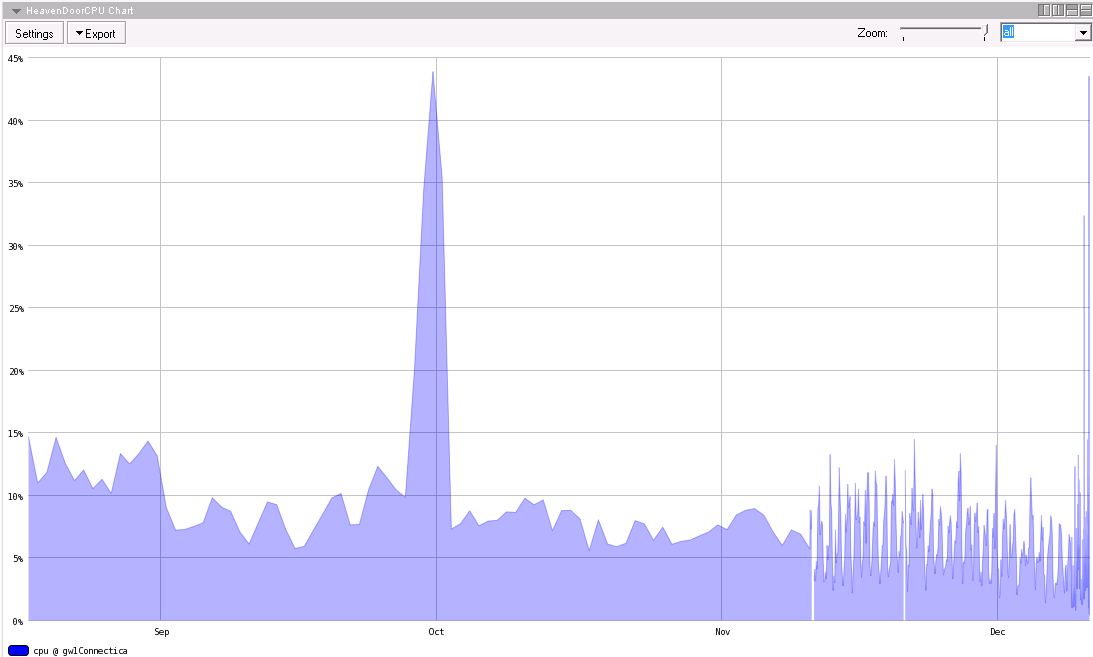
Some network parameters are critical, and it is useful to know how they have fluctuated over time. The Dude provides charts for this purpose. Following the manual, simply create a chart and select the parameter to monitor. This can be used to read anything, including CPU values, data throughput, operating voltage, and more.
4. Client maps
One useful application is to place a screenshot from a map in the background of a network map containing transmitters, then position clients approximately according to their home addresses. This produces a detailed subnet diagram, such as the one shown on The Dude website.

If you are dealing with something specialized, there is nothing better than checking ispforum.