Review: Ubiquiti UVC IP Camera
TL;DR ✨
He very much likes its product presentation: https://www.ubnt.com/unifi-video/unifi-video-camera/
The reviews, presentation, and promise of better software support caught the author's attention. On the other hand, he was concerned about the resolution quality for the price. The camera did not disappoint, however, and the author rates it as excellent.
The next device the author decided to test was Ubiquiti's UniFi UVC IP camera.
He very much likes its product presentation: https://www.ubnt.com/unifi-video/unifi-video-camera/
The product range is small but clear. The author chose the Ubiquiti UniFi UVC camera.
UniFi UVC camera

The reviews, presentation, and promise of better software support caught the author's attention. On the other hand, he was concerned about the resolution quality for the price. The camera did not disappoint, however, and the author rates it as excellent.
The camera itself is completely "dumb" and can do almost nothing. It displays only the basics:
- image
- data rate
- NVR connection
- login/password changes
- static IP
- gateway
- DNS
- and a few other minor settings

The real benefits appear only with the NVR. In their case, the author and his colleagues ran the software on Windows Server 2012 R2. It also runs on Ubuntu and, even better, the iOS and Android support is flawless. The manufacturer's software download is available here: https://www.ubnt.com/download/unifi-video/unifi-nvr
NVR
The NVR is simple, elegant, and intuitive. After logging in, all that is needed is to configure the camera and it is ready to go.
Cameras are easy to locate on the map
 In addition to live viewing, the interface shows the current CPU load, data rate, and many other parameters.
There is nothing novel about the camera being able to save recordings. Far more interesting are the useful, advanced recording filters and the option to lock recordings so that no other user can delete them.

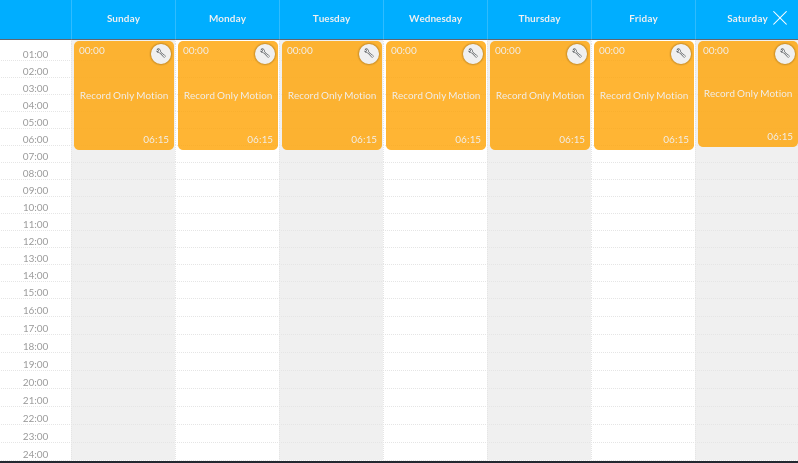
Various triggers can be configured for the camera, for example:
- Record continuously during a specified time
- Record during a specified time only when motion is detected
 Record only a specified section of the image
- Record only in darkness

 If the camera detects anything it does not like, it can be configured to send an email:
 Advanced access permissions can be configured for the camera, defining who has access to which features and cameras.

iOS
The UniFi app runs extremely well and without errors on iOS. After logging in...
 Everything needed is visible.

The current camera feed can be viewed

or the recording history can be reviewed
