ABRA FlexiBee Contract Registry Module
TL;DR ✨
ABRA FlexiBee has a fantastic recurring and automated invoicing module. However, it is fairly difficult to master at first.
The documentation is available here: https://www.flexibee.eu/podpora/dokumentace/napoveda/evidencesmluv/
ABRA FlexiBee has a fantastic recurring and automated invoicing module. However, it is fairly difficult to master at first.
The documentation is available here: https://www.flexibee.eu/podpora/dokumentace/napoveda/evidence_smluv/
The article covers three practical invoice-generation scenarios:
- prepaid invoices one month in advance,
- prepaid invoices one year in advance,
- postpaid invoices one month in arrears.
Prepaid Invoices One Month in Advance
Anyone who wants to generate invoices should read not only the link above, but also the documentation built directly into ABRA FlexiBee, especially the "contract examples" section.
How do you generate a monthly invoice in advance?
You invoice company "X" CZK 500 every month for providing internet access. The service is always supplied from the first to the last day of the month, for example from 1 February to 28 February. An invoice for the following month must always be generated 15 days before the beginning of the period being billed.
Valid from = 15.1.2011
Invoicing frequency (months) = 1
Turnover day = 1
Invoice days before/after = 15
Invoicing method = in advance
First invoice date: the day the contract is created (after 17.12.2010)
First invoice period: 15.1.2011 to 31.1.2011; the amount is calculated in proportion to the number of calendar days
Second invoice date: 17.1.2011
Second invoice period: 1.3.2011 to 30.3.2011
Neither the website documentation nor its specific example made much sense to the author, so he wrote the process down in his own way and illustrates it with a concrete example:
Goal
The goal is to generate an advance invoice on the 15th of each month for the author's internet services. This means that if he issues an invoice today, 28 June 2015, it will be an advance invoice covering 15 June through 14 July 2015.
Procedure
The author used the following settings. The same procedure can be repeated by following these steps.
- Set both the due date and the effective date to 15.06.2015.

- In the invoicing settings, set the invoicing frequency to 1.
Set the turnover day to the 15th day of month X and the turnover month to 1. Set the invoice type to an advance invoice. This can be configured under Sales - Document Types - Issued Invoice Types.
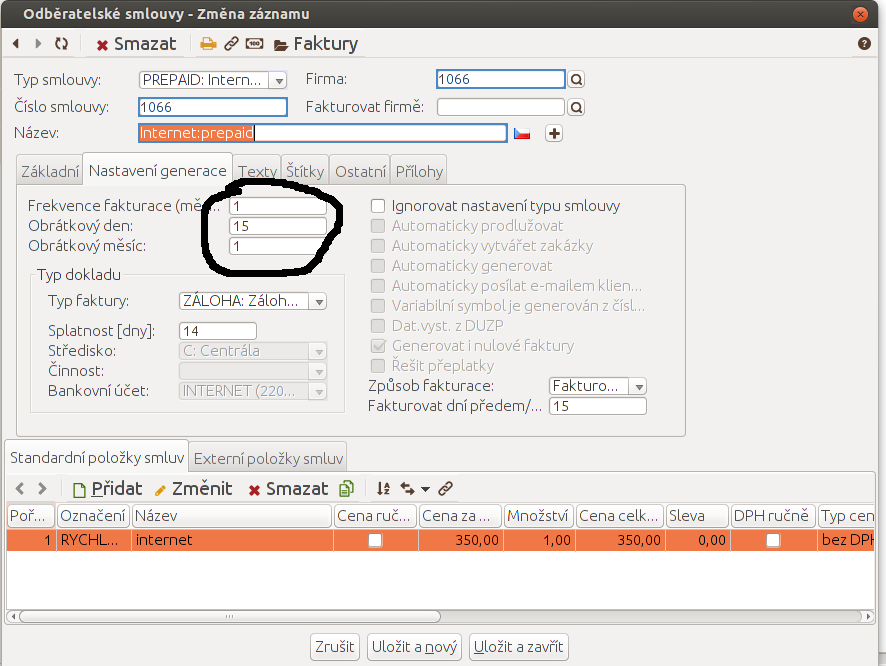
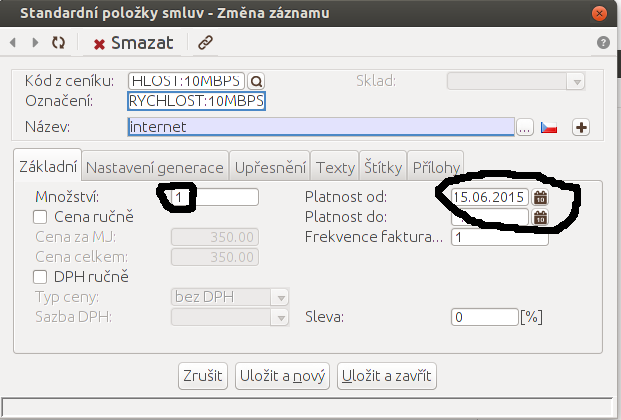
- Click Add below the standard contract items and select the service. Choose
the corresponding price-list code, enter quantity
1, set validity from the 15th day of the selected month, and use invoicing frequency1.
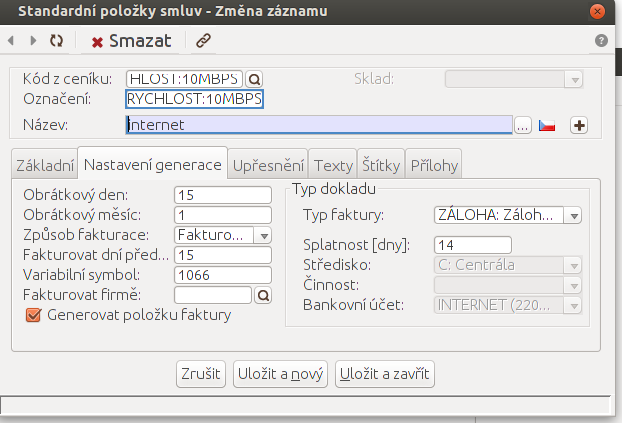
- In the generation settings section, the author entered essentially the same values as in the customer contract generation settings. In theory, ABRA should apply some form of priority in this order:
Generation settings for a standard contract item > generation settings for customer contracts > basic settings under customer contract types.
The author did not test this variation. After several hours of configuration, he was simply glad that the module worked as required.
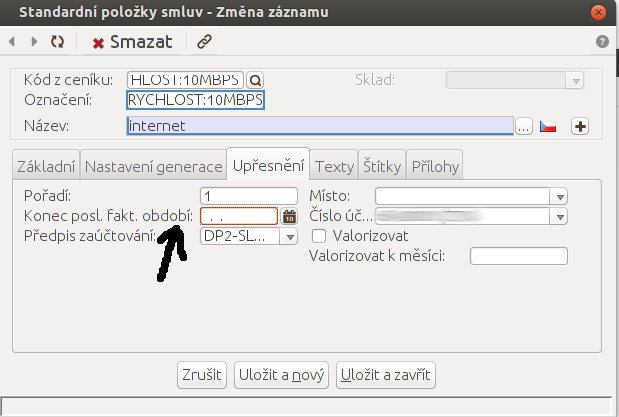
- Check that the end date of the last invoicing period is blank in the Details section. If it is filled in, it causes trouble when testing invoice generation. If a test invoice is generated and then deleted, the generated date in this section must be deleted as well.
- Now save everything and press the magic Generate Invoices button in the upper-right corner. Once the invoice has been generated, check that everything is correct.
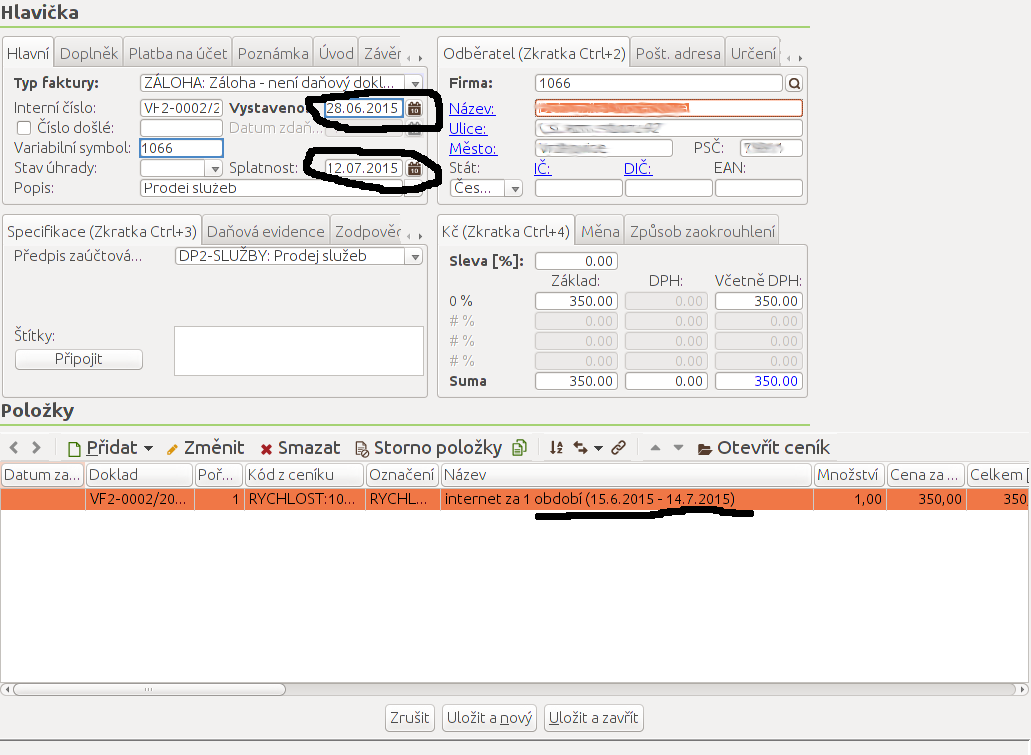
- Finally, open the complete invoice and verify its items, amount, dates, and invoicing period.
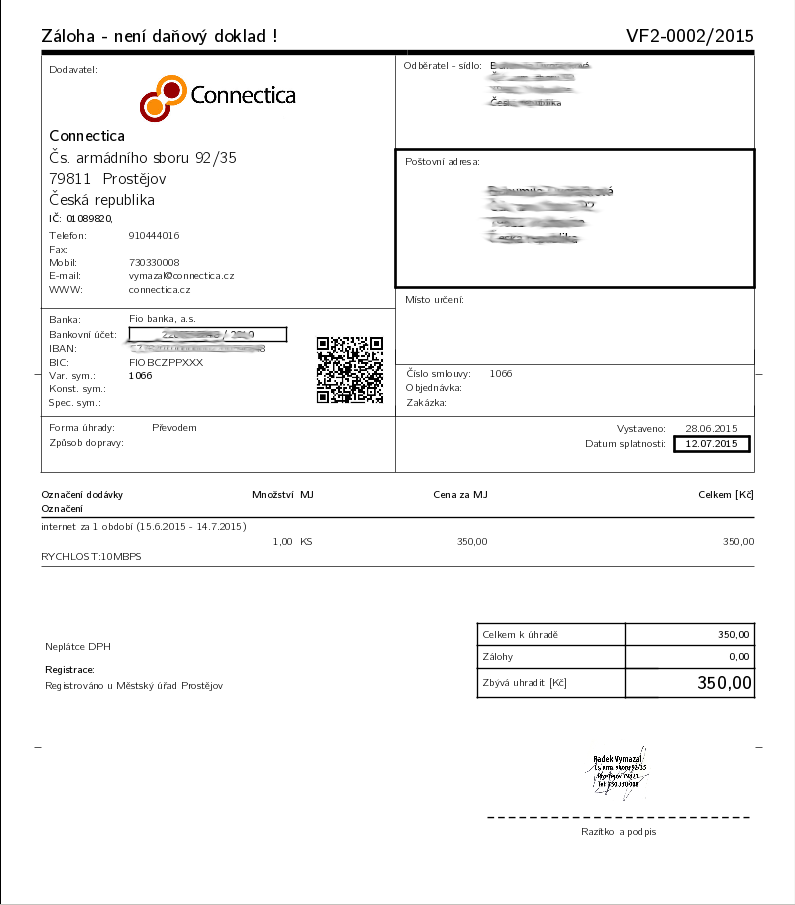
Invoicing by calendar month
To avoid generating invoices for periods from the 15th through the 14th of the
following month, set validity from the first day of the month and use turnover
day 1. The invoice itself can still be issued on the 15th.
Prepaid Invoices One Year in Advance
The main changes from the previous procedure are in these fields:
- turnover month
- invoicing frequency
- invoiced quantity
For an invoice issued one year in advance from 01.11.2015, the turnover month will be 11 and the invoicing frequency will be 12.
The author set the turnover day to 1 so that the invoice would cover 01.11.2015-31.10.2016. If the turnover day is set to 15, the invoice will cover 15.11.2015-14.10.2016.

In this example, one month of internet service costs CZK 300. Annual invoicing uses
quantity 12, producing a total of CZK 300 × 12 = CZK 3,600.

Postpaid Invoices One Month in Arrears
Compared with the original procedure for prepaid invoicing one month in advance, postpaid invoices mainly differ in the following fields:
- The invoice type is not an advance document, but a standard invoice.
- The invoicing method is not in advance, but in arrears.
Everything else remains the same as for prepaid invoicing one month in advance.
Anyone who needs help can send the author a ticket and follow the advice on how to write one properly: http://faq.connectica.cz/support/jak-mam-napsat-ticket/